Fit Curation
The pipeline through Stage 6 produces a fitted line list
and renders it as a self-contained report. Curation is the act of correcting
that fit (adding a line the detector missed, removing a spurious one,
adjudicating a blend) and folding the corrections back into the .ftmw file.
The Stage 6 page covers the individual edit verbs and the rule that binds them:
every edit re-runs the affected window’s nonlinear least-squares fit, so a
curated line is fit as honestly as an automatic one, and each decision is
recorded with its provenance.
This page documents the two surfaces built for curating at production scale, where a spectrum may carry hundreds of windows and thousands of lines: the portable HTML report a reader works through in a browser, and the curation file that batches a session of edits into one reproducible command.
Anatomy of the HTML report
report run writes one portable <stem>_report.html. It is assembled
internally as a set of linked pages, then folded into a single document with the
stylesheet inlined and every figure base64-embedded, so the cross-page links
become in-document anchors. The result has no external dependencies: it opens in
any browser, archives beside the .ftmw file, and mails to a collaborator as
a single attachment, with no server and no asset directory.
The report carries three kinds of content:
An index. A summary block (the experiment’s calibration state, line count, and worklist tally), a clickable full-spectrum overview with the attention-flagged windows shaded, a windows table, an applied-edits table when the file already carries curation decisions (see below), and the finalized line list.
A methods-and-results page. The per-stage algorithm prose with this experiment’s own numbers folded in, a diagnostic figure for each stage — including the Stage 3 detections drawn over both the active FT and the primary-pass (Blackman-Harris) detection spectrum the detector localizes on, so a leakage-dominated regime is legible — distribution histograms of the fitted parameters, and rendered display math.
One page per fit window. The fit panels (real, imaginary, and magnitude data with the model and residuals), the fitted lines with their raw and calibrated frequencies, the parameter covariance, the candidate ledger, the recorded decisions, and the fit history. Where a window carries an attention flag with a definite locus, the magnitude panel is annotated with a small caret and one-letter tag at that frequency — C for a missed-line (candidate) residual, S for a line sitting on a gated spur, M for an auto-merged pair — so it is obvious where to look; hover the caret for the reason detail.
The single-file report carries a sticky navigation bar. Besides the section
links and the Jump to window picker, a Freq MHz box jumps to the window
nearest a typed frequency, and a pair of window buttons step to the previous
/ next window. Keyboard shortcuts mirror these: j / k move to the next /
previous window. Both the buttons and the keys skip windows hidden by the tag
filter, so the filter selects which window types you step through. The controls
are inert when scripting is disabled; the anchors still work. Each window’s own
title bar also carries index / prev / next buttons and a Full spectrum
toggle that reveals — hidden by default — the clickable full-spectrum overview
inside the window header, with this window highlighted.
Each window header carries a row of tag chips classifying the window at a
glance — attention (in the review queue), edited / reviewed (its
curation provenance), cascade-edit (changed only because another window’s
edit propagated into it), merged (an auto-merged degenerate pair),
high-χ²ᵣ / high-ε (fit-quality outliers), and catalog-match (a
catalog hit, when a catalog was supplied). A Filter menu in the navigation
bar lists the tags present in the report; ticking one or more hides every window
whose tags do not include any of the ticked ones (Show all clears the
filter). The keyboard and window-step navigation skip the hidden windows while a
filter is active.
Three flags scope the output for large spectra, where rendering a detail page for every window is neither fast nor useful:
--summarykeeps the index and the methods page only, with no per-window detail.--windows attentionrenders detail pages only for the windows the review flagged, so a spectrum with thousands of windows still produces a report sized to the analyst’s worklist.--level1-onlywrites the data table alone, with no HTML;--no-tablewrites the HTML alone.
$ ftmwpipeline report run exp_2638.ftmw
report run: wrote table to exp_2638_lines.csv
report run: wrote self-contained full HTML report to exp_2638_report.html
Curating in the browser
The report opens read-only. A Curate toggle in the navigation bar flips
it into curation mode, revealing an inline control on each fitted-line and
candidate-ledger row and making the per-window plots clickable. Every control
only queues an edit; nothing edits the .ftmw file from the page. Queued
edits collect in a docked cart, grouped by window, and each one draws a
marker on its window plot, color-coded by action and removable with a click:
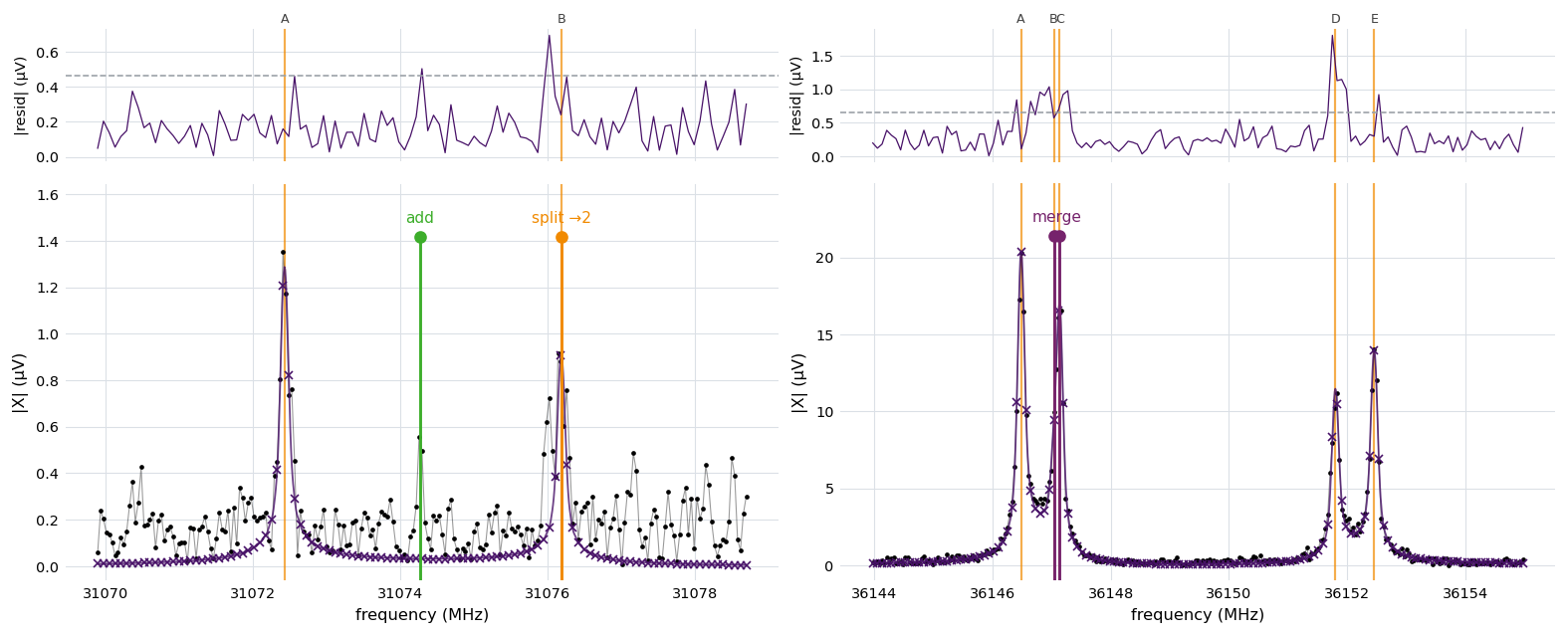
The report’s own magnitude panels for two windows, overlaid with a curation
cart exported from the browser (the marker colors match the in-report
controls). Each panel shows the fitted model on the display grid above a
residual strip, with the per-peak labels the report assigns. On the left
window, a split marker (orange) divides a weak line in two and an add
(green) seeds a missed line in the gap beside it; on the right window, a
merge marker (purple) collapses a resolved close pair into one. The
markers are queued intentions, not yet applied: exporting the cart writes them
to a curation file that review apply refits.
The cart’s Download .csv and Copy controls export the queued edits as a
curation file (<stem>_curation.csv) and print the review apply
command that replays it. The frequency a control emits is the line’s raw
Stage 5 model frequency, the value the edit verbs match on, not the calibrated
value shown in the table. The browser never writes to the file; it only composes
the curation file that the command-line tool applies.
Several convenience controls speed a long worklist. Each window’s title bar
carries Mark reviewed, Reviewed & next (marks it reviewed and advances to
the next window, honouring the tag filter), and Clear window edits (drops just
that window’s queued ops); the index windows table gains a per-row reviewed
button, in its own column on attention windows, so they can be triaged from the
overview without scrolling to each. Marking a window reviewed (from either place)
also clears its attention tint from the overview, and the two buttons stay in
sync. A cart entry is clickable — it scrolls to its originating window and flashes
the row. In curation mode the
magnitude plots take keyboard shortcuts that act on the peak nearest the pointer,
mirroring click-to-add: hover the plot near a line, then press r to remove
it, s to split it in two, or m to merge it with its nearest neighbour;
a arms (and disarms) click-to-add on that plot. The affected line flashes and
its marker appears on the plot. The cart lists these keys for reference.
Applied edits and rollback
When a report is generated from a .ftmw that already carries curation edits,
the index lists them in an Applied edits table — the file’s recorded decision
log, in execution order, with each edit’s window, action, and frequency anchor.
This is a read-only record of the file’s curation state and is always shown. In
curation mode each row gains an Undo button; queuing one does not enter the
curation file (a rollback is a different operation) but instead makes the cart
surface a review undo command alongside the review apply one:
ftmwpipeline review undo exp_2638.ftmw --id 3 5
review undo restores the automatic-fit baseline snapshot and replays every
surviving decision, so undoing by id is exact and order-independent; the ids
shown in the table are the ones to pass.
Curation files
A curation file is a small CSV that records an ordered sequence of edits, one per row. It is the canonical interchange for a curation session: diffable, hand-editable, and independent of the report that may have authored it. The browser cart writes one, and a curation file is equally well written by hand or generated by a script.
The header is action,window,freqs,params. Each row names one action, the
integer window id it targets, the molecular frequencies it carries (a
;-separated list, in MHz), and any ;-separated key=value modifiers.
Blank lines and lines beginning with # are ignored, and a leading header row
is optional.
|
|
Effect |
|
|---|---|---|---|
|
one |
Revive the nearest ledger candidate within tolerance, or seed a fresh line at the frequency. |
none |
|
one |
Drop the fitted line nearest the frequency. |
none |
|
two or more |
Collapse the named lines to one (amplitudes summed, frequency the signal-to-noise-weighted mean). |
none |
|
one |
Replace the named line with |
|
|
none |
Dismiss the window as reviewed with no change, or revive a named candidate. |
|
A representative curation file:
action,window,freqs,params
remove,42,26613.6131,
add,42,26614.20,
merge,17,9001.10;9001.18,
split,5,12000.50,into=3
accept,8,,candidate=15001.4
Edits on one window are coalesced before they are applied. A maximal run of
add and remove rows on the same window collapses into a single refit
rather than one refit per row, so the two rows for window 42 above become one
edit. A merge, split, or accept on a window flushes that window’s
pending edit first, because each carries its own physics-aware seeding. Windows
are independent, so an edit interleaved on another window does not break the
coalescing of a pending group.
Applying a curation file
review apply replays a curation file through the same single-window refit
that the interactive verbs call, so a batch of edits produces exactly the result
of running the resolved plan by hand. --dry-run prints the resolved,
coalesced plan and any frequency-resolution warnings without touching the file:
$ ftmwpipeline review apply exp_2638.ftmw exp_2638_curation.csv --dry-run
review apply (dry run): resolved plan
    1. edit window 42: add 26614.2000; remove 26613.6131
    2. merge window 17: peaks 9001.1000, 9001.1800
    3. split window 5: peak 12000.5000 into 3
    4. accept window 8: candidate 15001.4000
4 action(s) would be applied (nothing written).
The warnings catch the two ways a target frequency fails to resolve: a
remove, merge, or split frequency that matches no fitted peak within
tolerance (the edit would fail), or one that sits within tolerance of more than
one peak (the nearest is taken, which may not be the intended line). Previewing
them before the refit is the reason --dry-run exists. add and revived
candidates create peaks, so they are not checked.
Dropping --dry-run applies the plan, refitting each affected window in place:
$ ftmwpipeline review apply exp_2638.ftmw exp_2638_curation.csv
review apply: plan
    1. edit window 42: add 26614.2000; remove 26613.6131
    ...
applied 4 action(s).
Each applied edit appends an anchored entry to the
Stage 6 decision log, exactly as the interactive verbs
do, so a curation file’s effects carry their provenance and survive re-running
an upstream stage. The same Python entry points are available on the functional
API and the Pipeline class:
import ftmwpipeline.api as ftmw

preview = ftmw.review_apply("exp_2638.ftmw", "exp_2638_curation.csv", dry_run=True)
for action in preview.plan:
    print(action.kind, action.window_id)
print(preview.warnings)

result = ftmw.review_apply("exp_2638.ftmw", "exp_2638_curation.csv")
print(result.applied)   # number of actions refit